
Add a web version link to your newsletter so your subscribers can view it in their browser if their email client doesn't display it correctly.
The web version is the version of your newsletter that your subscribers can view in their browser. Along with the contact name and the unsubscribe link, it's one of the details you shouldn't forget in your email marketing campaigns.
Add the link with the New editor with AI
To turn a text in your newsletter into the web version link:
- Select the link text, for example "View in browser".
- In the text toolbar, click Link.
- In Link address, click Variables and, in Campaign, choose Web version. The {{ web_version }} variable is added.
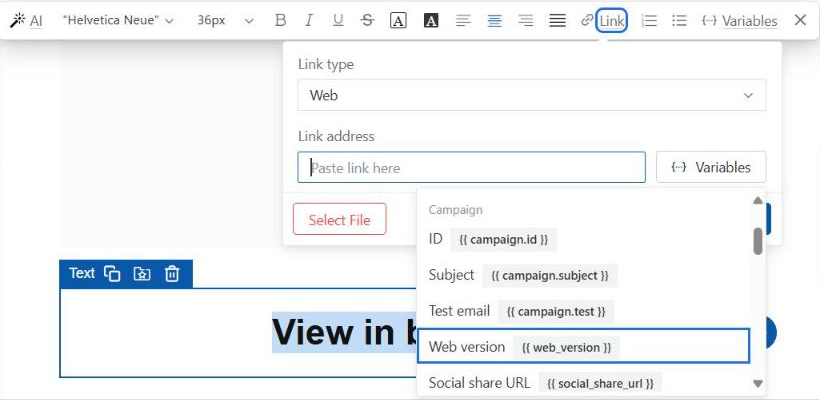
- Click Apply.
Section 4.16 of Create a newsletter with the visual editor also explains how to add this link.
Add the link with the Paste code editor
To add the link in the Paste code editor:
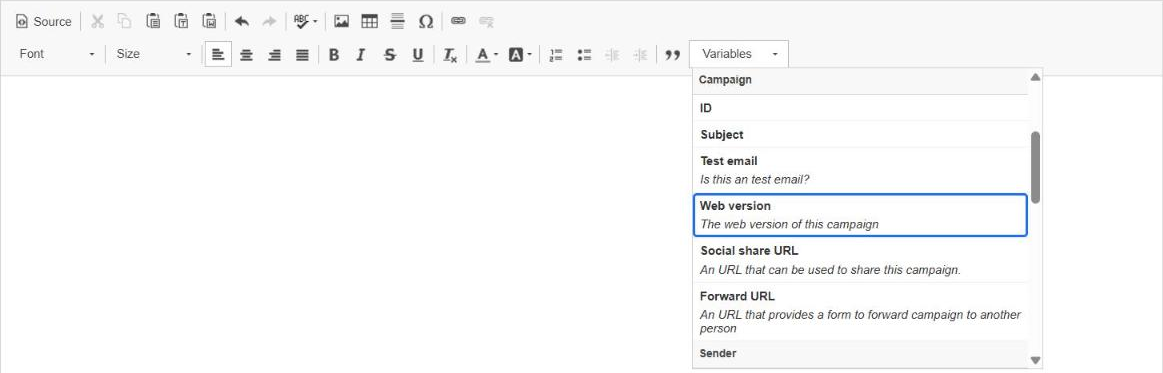
- Place the cursor where you want the link.
- In the Variables drop-down, in Campaign, choose Web version. A link with the text "Web version" is added.
Change the link text
To change the text "Web version" to another one, such as "View in browser":
- Double-click the link, or place the cursor inside the link and click Link (the chain icon). The Link window opens.
- In Display Text, type the text your subscribers will see.
- Click OK.
In the window you will also see Link Type URL, Protocol <other> and URL {{ web_version }}. That is the variable that Mailrelay replaces with the address of your newsletter's web version.
Frequently asked questions
These are the most common questions about the web version link.
What text can I use for the link?
Any text you want, for example "View in browser". In the Paste code editor, the link is added with the text "Web version" and you can change it in Display Text.
Can I add the link with the free account?
Yes. The web version variable is in both editors on the free account, the one you use for your mailings and your newsletter.