Emails in Processed status
Sometimes, when you send a newsletter, some of the emails to your subscribers may remain in Processed status for a while.
In this article, we explain the possible causes of emails in Processed status and when you need to contact our support team.
TABLE OF CONTENTS
- What does it mean when messages or emails are in Processed status?
- Where can I see my emails in Processed status?
- Why do some emails stay in Processed status?
- How do I fix emails or messages in Processed status?
- Can emails in Processed status be deleted?
What does it mean when messages or emails are in Processed status?
If an email is in Processed status, it has not been delivered yet: the destination server has not accepted it yet and the email is still in our sending queue, where we retry it automatically. It is not always caused by a problem with your account: below you will find the most common causes.
Maximum time in the queue
By default, an email can stay in Processed status for up to 5 days. If it is not delivered within that time, it is discarded and moves to Soft bounced.
Retry frequency
There is no fixed interval: our server adjusts retries based on the error returned by the provider. For example, if the provider indicates that the sender domain has exceeded its hourly message limit, delivery is retried 1 hour later. If it is a connection or timeout error, delivery is retried within a few seconds and, if it keeps failing, the time between retries increases.
Where can I see my emails in Processed status?
After sending a campaign, go to Reports >> Sent campaigns and click the magnifying glass icon (Show) for that campaign. In the Sent emails tab, choose Status equals: Processed and click Search.
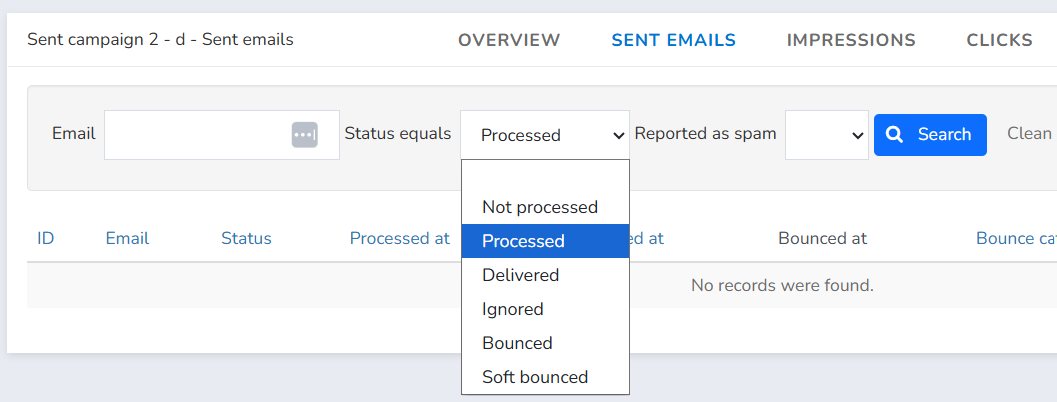
The emails shown have not been delivered yet: they are still in our sending queue.
Why do some emails stay in Processed status?
Emails usually stay in Processed status for one of the following reasons:
Volume rejections by large providers (Gmail, Outlook.com, Yahoo!)
Large providers such as Gmail, Outlook.com or Yahoo! limit the number of emails per hour they accept from the same sender domain and temporarily reject those that exceed that limit. In large campaigns with many recipients at the same provider, some emails wait their turn and are delivered as the provider accepts them. These rejections are not usually permanent: delivery is slower and, in the meantime, the messages stay in Processed status.
Spam-related rejections
When you send a newsletter, filters gradually analyze the content of the emails and how subscribers react to them. This slower delivery flow exists precisely so the sending can be examined closely.
If the filters detect that users are rejecting the content as unwanted or harmful, the messages will likely be considered spam and the emails still in Processed status may be blocked.
Emails are usually delivered in the end, unless one of the large ISPs blocks the sending IP, in which case emails to that provider wait until the IP is enabled again, for no longer than the maximum time in the queue.
This is uncommon, but it can happen.
Greylisting
Some servers deliberately reject the first delivery attempt from an unknown sender and only accept the email if it is retried after some time. It is an anti-spam technique, because legitimate servers retry and many spam senders do not. That is why we cannot retry immediately: we must wait for the minimum time required by the receiving server, which can range from a few minutes to several hours.
Problems with the receiving server
The server may be down, overloaded or experiencing temporary issues. We keep retrying until it works again or until the maximum time in the queue is reached.
Misconfigured destination domain
The recipient's domain has DNS problems, for example it has no MX records. If this is fixed before the maximum time in the queue runs out, the email is delivered.
Temporary IP block at a specific provider
Emails to that provider wait until the IP is enabled again.
Delivery restricted to certain time frames
If you checked “Restrict emails delivery to certain time frames” when sending the campaign, emails are only delivered on the selected days and hours. Outside them, emails stay in Processed status until the next time frame starts.
How do I fix emails or messages in Processed status?
Emails in Processed status are retried automatically until the maximum time in the queue. We recommend:
- Wait about four hours and check again how many emails are in Processed status.
- If the number has gone down, delivery is in progress: keep waiting.
- If it has not gone down, contact support. If you restricted delivery to certain time frames, keep in mind that the number does not go down outside those hours.
How can you prevent this from happening with your newsletters?
- Keep in mind that Mailrelay IPs are shared (although you can purchase dedicated IPs); because they are shared, emails from your IP "neighbors" affect your own messages. However, if all senders follow good email marketing practices, everyone benefits and the problem of emails in Processed status is avoided.
- Sending newsletters within limits suited to your reputation and avoiding being marked as spam as much as possible will help not only you, but also your IP neighbors.
- Remember that your sending domain can be blocked. Do not use newly registered domains as senders, to avoid blocks.
In short, following good sending practices reduces the number of emails in Processed status. If the number has not gone down after about four hours, contact support.
Can emails in Processed status be deleted?
Not by default: emails in Processed status keep being retried and are delivered once the destination server accepts them. If you need to prevent this, for example for a promotion with an expiry date or because of a local regulation that prohibits sending emails after a certain period, contact us and we can enable a button in your panel to manually delete emails in Processed status.
Was this article helpful?
That’s Great!
Thank you for your feedback
Sorry! We couldn't be helpful
Thank you for your feedback
Feedback sent
We appreciate your effort and will try to fix the article